
Organise your inbox and answer common enquiries.
We set up your email to identify what each customer needs, answer common questions and save details where you need them. AI understands the message and asks for anything missing. We can start with one type of enquiry, such as requests for information.

A free, no-obligation introductory conversation. We arrange a day and time on WhatsApp.
The email gets a reply and the enquiry moves forward.
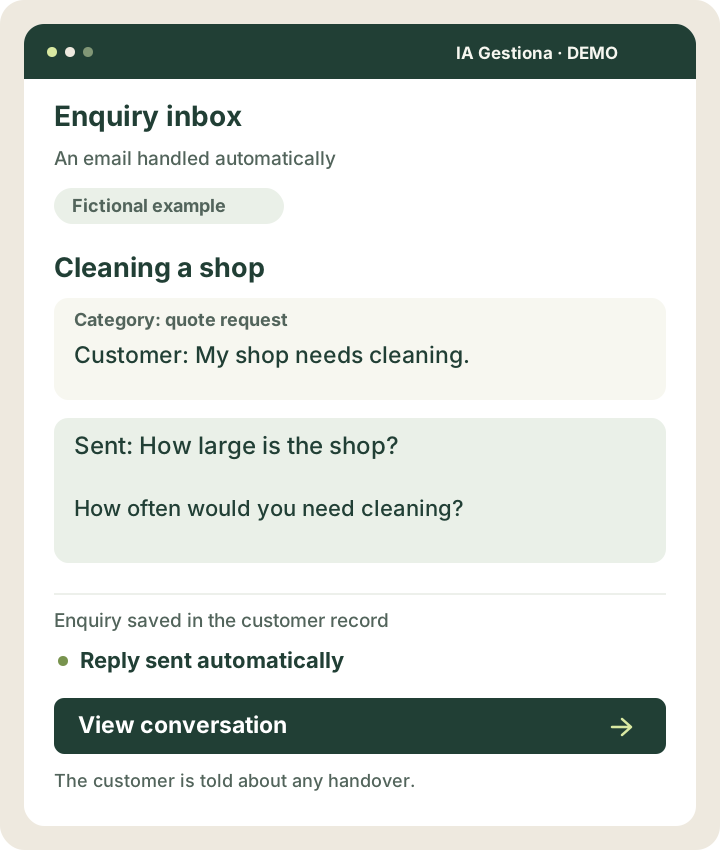
A customer asks about cleaning their shop. AI recognises the enquiry and emails them to ask about the size of the premises and how often cleaning is needed. It saves the enquiry and adds the details when the customer replies. The information stays together without copying each email. If it cannot answer a question using the available information or the customer asks for a person, it tells them someone will continue the conversation.
AI identifies and categorises the quote request.
It sends the questions needed to complete the details.
The enquiry and replies are saved in one record.
Let’s discuss it in 30 minutes. We arrange a day and time on WhatsApp.

Cleaning a shop
The result: Reply sent automatically
View the example screen
 View larger example ↗
Demonstration screen with fictional data. Tailored to your business.
How we can help
An organised inbox
Classify enquiries and documents to trigger the next step.
Replies that move things forward
Answer routine questions and email customers for missing details.
Less copying and pasting
Save details, attachments or tasks in the tools you already use.
Small improvements that make sense
- Sort messages by enquiry type.
- Answer routine questions using your business information.
- Ask for missing details and update the record when the customer replies.
- Save attachments in the right folder.
- Notify you only of enquiries that need intervention.
- Send confirmations, quotes and reminders using agreed rules.
A cleaning business receives an enquiry about a shop.
A customer asks for weekly cleaning. AI identifies the request and asks for the floor area and address. When the details arrive, it saves them and, if the service fits the configured rates, prepares and sends a quote. If a special assessment is needed, it informs the customer and alerts the person responsible.
Illustrative scenario. This is not a client case study or a guarantee of results.
Understand an email and send a useful reply.
AI distinguishes a quote request from a service question, even when the wording changes. It extracts details, asks for what is missing and prepares the response to be sent within the business’s rules.
A simple example
An email asks for weekly cleaning without specifying the floor area. AI asks how large the shop is and saves the reply in the enquiry to continue with the quote.
How it works and when it asks for help
Prices and terms come from your sources and rules. If it cannot resolve the request with the available information and tools, it explains the problem to the customer and lets them know a person will continue the conversation.
One possible journey
An email arrives
AI identifies the request
It extracts details or asks for more
It sends the agreed reply
It records and continues the process
You might
be wondering…
Can replies be sent automatically?
Yes. We configure automatic sending for enquiries within the service, using agreed information and rules. AI asks for missing details; if it cannot resolve the request or the customer asks for a person, it informs them and hands over.
Will it work with my email provider?
We can assess Google Workspace, Microsoft 365 and other providers, depending on their permissions and connection options.
Other solutions that may help



Your next improvement
starts with a conversation.
A free, no-obligation introductory conversation. We arrange a day and time on WhatsApp.