
Try an AI assistant for your routine phone enquiries.
We start with a small trial: an AI assistant that answers calls about opening hours, services or appointments. We check whether it can connect to your phone system and calendar. If it works for your business, we agree how to put it into use. It hands over only if it cannot resolve the enquiry or the customer asks for a person.

A free, no-obligation introductory conversation. We arrange a day and time on WhatsApp.
An appointment call answered by AI.
In this initial trial for a garage, the assistant says it is AI and handles one specific request: booking a vehicle service. It checks the connected calendar, offers a free slot and books it when the customer agrees. It saves the appointment details and sends confirmation on WhatsApp if that is the agreed channel. If it cannot complete the request or the customer asks for a person, it tells them someone will continue the conversation and alerts the garage.
The assistant identifies the enquiry and collects the necessary details.
It checks the connected calendar and confirms the customer’s chosen slot.
It saves the appointment and sends confirmation through the agreed channel.
Let’s discuss it in 30 minutes. We arrange a day and time on WhatsApp.
Vehicle service · garage
The result: Appointment confirmed in calendar
View the example screen
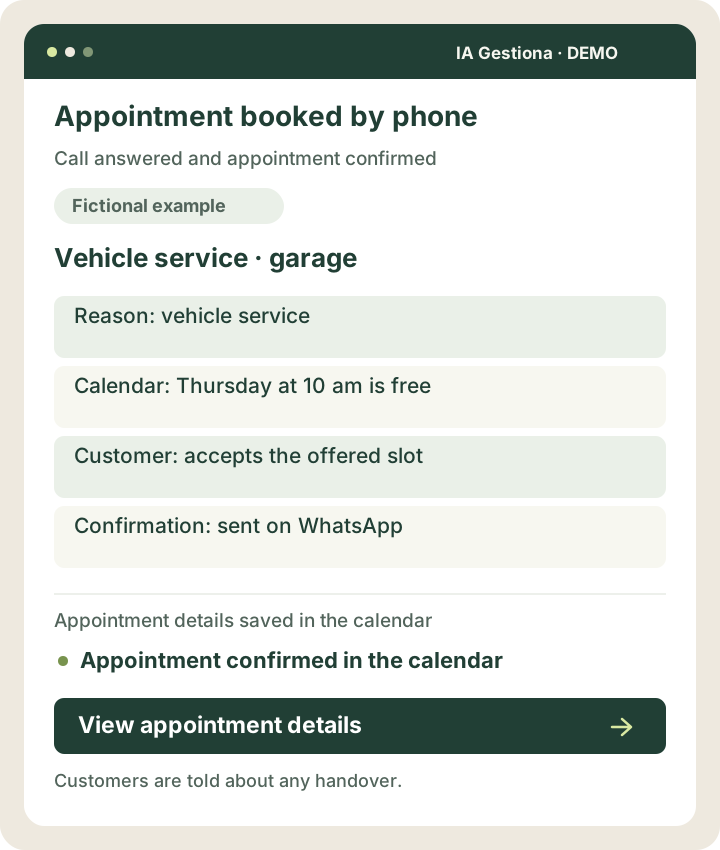 View larger example ↗
Demonstration screen with fictional data. Tailored to your business.
How we can help
A response that helps
Answer using your business information and ask for the details needed.
Appointments in your calendar
Offer an available slot, confirm the customer’s choice and send the agreed reminder.
A clear handover
If a person is needed, explain why and follow the agreed transfer or notification process.
Small improvements that make sense
- Share opening hours and service information.
- Identify the reason for the call and collect the necessary details.
- Check the connected calendar and offer available slots.
- Confirm the chosen appointment and send confirmation.
- Inform the customer and the person responsible when a request cannot be resolved.
- Save a summary where processing is appropriate.
A workshop receives a call during a repair.
A customer calls to book a vehicle service. The assistant introduces itself as AI, checks the connected calendar and offers Thursday at 10 am. The customer accepts; the appointment is saved and confirmation is sent through the agreed channel. If the service is outside the agreed scope or the calendar fails, it explains that help is needed and transfers the enquiry or alerts the garage.
Illustrative scenario. This is not a client case study or a guarantee of results.
Understand a call and complete a task.
An AI voice assistant can understand the request, ask questions and use connected tools to complete specific tasks. We start with a few functions and test routine cases and exceptions.
A simple example
“I would like to book a vehicle service.” The assistant checks the garage’s calendar, offers a time and books it when the customer accepts.
How it works and when it asks for help
It identifies itself as AI and does not handle emergencies. If something is unclear, it asks for clarification first. If it still cannot resolve the enquiry, it informs the customer and transfers it or alerts a person.
One possible journey
A call arrives
The assistant identifies itself as AI
It checks the information needed
It resolves the request and confirms
It records the result
You might
be wondering…
Will customers know they are speaking to an automated system?
Yes. The assistant identifies itself as AI at the start. Customers can ask to speak to a person and are told when their enquiry needs to be handed over.
Can it confirm any appointment?
It can confirm appointments within the agreed rules when it has reliable calendar access. If a request cannot be resolved or the booking cannot be verified, it explains this and asks for help; it does not confirm an unverified appointment.



Your next improvement
starts with a conversation.
A free, no-obligation introductory conversation. We arrange a day and time on WhatsApp.